Understanding Your Dashboard
Your STEVEN dashboard is your command center for wedding planning! This guide will help you navigate and make the most of all the information and tools available at your fingertips.
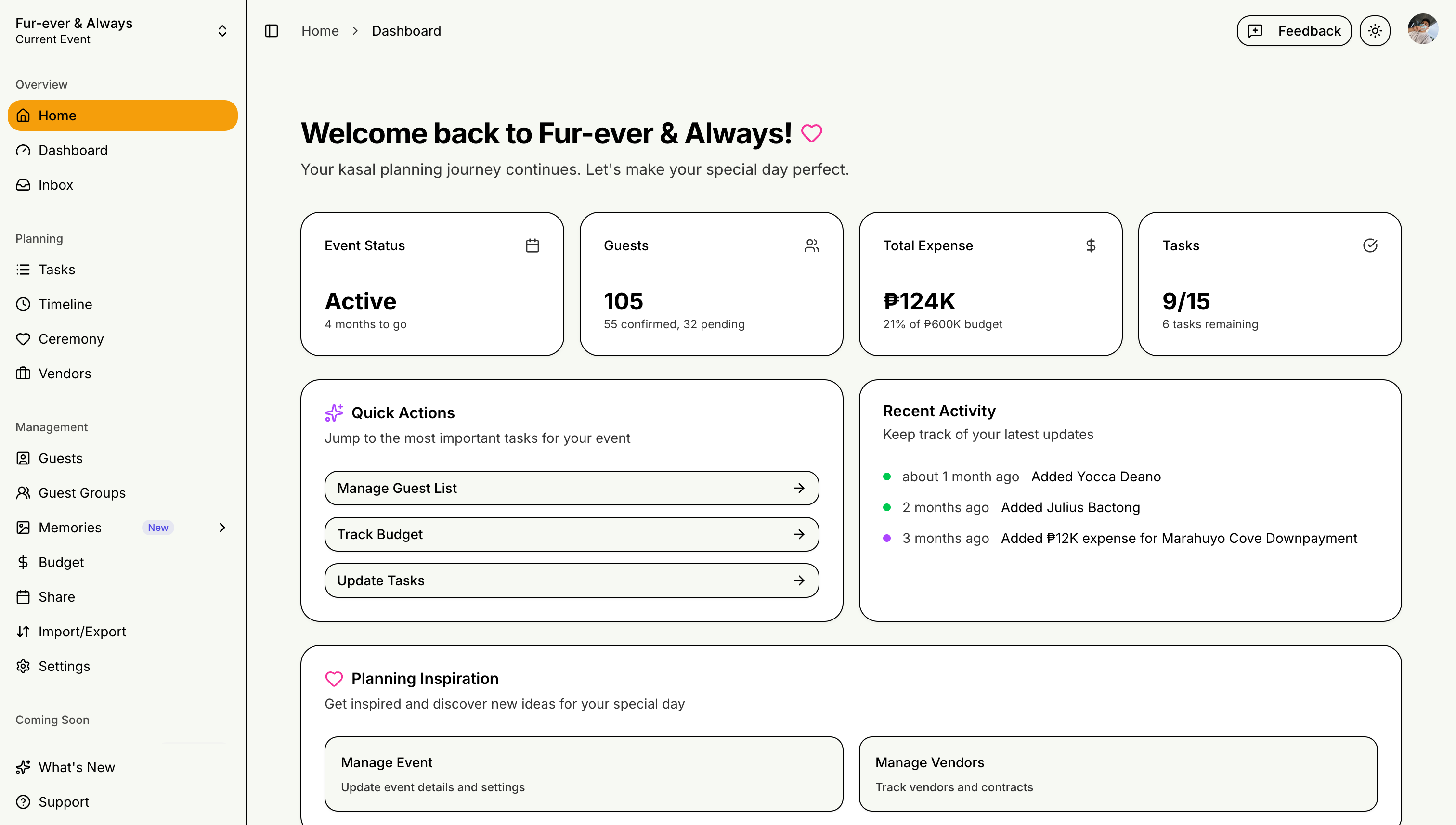
Dashboard Layout
When you log into STEVEN, your dashboard provides a comprehensive overview of your event planning progress:
Top Navigation Bar
- STEVEN Logo: Click to return to dashboard
- Event Switcher: Switch between multiple events (Pro plan)
- Profile Menu: Access settings and account information
- Notifications: View updates and reminders
Main Dashboard Sections
Quick Stats Cards (Top Row)
Four key metrics give you instant insight:
-
Total Invited
- Total number of guests in your list
- Includes all guest statuses
-
Attending
- Guests who confirmed they're coming
- Shows your actual headcount
-
Not Attending
- Guests who declined your invitation
- Helps with final planning numbers
-
Pending Responses
- Guests who haven't responded yet
- Focus your follow-up efforts here
Day-of and Capacity Stats
- Checked In: Running total of guests who have arrived (see Day-of Check-In)
- Confirmed Seats: Total seats reserved by attending guests
- Capacity vs Plan Limit: Your guest count against your plan's maximum
RSVP Deadline & Event Date
- Days until RSVP deadline: Countdown timer
- Days until event: Time remaining for planning
- Visual progress indicators
Main Dashboard Cards
Guest Overview Chart
Visual representation of your guest responses:
- Green: Confirmed attending
- Red: Not attending
- Gray: Pending responses
- Interactive: Click sections for detailed breakdowns
Recent Guest Activity
Real-time updates showing:
- Latest RSVP responses
- Guest list additions
- Status changes
- Response timestamps
Budget Summary
- Total Budget: Your overall event budget
- Spent So Far: Current expense total
- Remaining: Available budget
- Progress Bar: Visual spending indicator
Upcoming Tasks
- High Priority: Critical planning tasks
- Due Soon: Tasks approaching deadlines
- Overdue: Tasks that need immediate attention
- Quick Add: Create new tasks directly
Real-Time Updates
Your dashboard updates automatically when:
- Guests submit RSVP responses
- New expenses are added
- Tasks are completed
- Guest information changes
Notification Indicators
- Red dot: New activity requiring attention
- Numbers: Count of pending items
- Bell icon: System notifications
Mobile Dashboard
The mobile version optimizes for on-the-go planning:
Swipe Navigation
- Swipe between dashboard sections
- Quick access to key features
- Touch-optimized controls
Priority Information
Mobile shows the most critical data:
- RSVP count and deadline
- Budget overview
- Urgent tasks
- Recent guest activity
Getting Started from Dashboard
For New Events (No Guests Added)
If you haven't added guests yet, you'll see:
- Welcome message with next steps
- Add Guests button for quick start
- Import Data button for CSV uploads
- Onboarding tips for new users
First Steps Recommendations
- Add Your First Guests - Start with immediate family
- Set Your Budget - Enter overall wedding budget
- Create Tasks - Begin your planning checklist
- Explore Features - Navigate to different sections
Dashboard Actions
Quick Actions
From your dashboard, you can:
- Add New Guest: Quick guest addition
- Record Expense: Log a new expense
- Create Task: Add planning reminders
- View Full Reports: Detailed analytics
Navigation Menu
Access all STEVEN features:
- Dashboard: Your current view
- Guests: Manage your guest list
- Guest Groups: Organize guests into families and circles
- Budget: Track expenses and budget
- Timeline: Plan your event schedule
- Vendors: Manage supplier contacts
- Ceremony: Wedding-specific planning
- Seating: Tables and guest assignments
- Layout Planner: Design your floor plan
- Memories: Guest photo and video gallery
- Ask Steven: Your AI planning assistant
- Tasks: Planning checklist
- Inbox: Notifications and reminders in one feed
- Settings: Event and account settings
Event Home & Getting Started
Besides the dashboard, each event also has an event home page with a Getting Started checklist, budget/vendor/task summaries, and sharing shortcuts — handy when setting up a new event.
Understanding the Numbers
Response Rates
- Good Response Rate: 70-80% within 2 weeks
- Excellent Response Rate: 85%+
- Follow-up Needed: Below 60% after 3 weeks
Budget Tracking
- Green Status: Spending on track
- Yellow Warning: Approaching budget limit
- Red Alert: Over budget
Capacity Planning
- Venue Capacity: Maximum attendees allowed
- Current Confirmed: Actual attendees
- Buffer Space: Remaining capacity
Dashboard Tips for Large Weddings
Large Guest Lists
Big celebrations often have 100+ guests:
- Family Tracking: Use family groupings
- Principal Sponsors: Separate category for godparents and honored guests
- Plus-Ones: Account for family members' guests
- Children: Track young family members
Multiple Events
Consider tracking:
- Civil Ceremony: Legal wedding
- Religious Ceremony: Church or officiant-led ceremony
- Reception: Celebration party
- Pre-wedding Events: Rehearsal dinner, bridal showers, etc.
Important Indicators
Subscription Limits
Your dashboard shows plan limits:
- Guest Limit Warning: Approaching guest maximum
- Event Limit: Number of events used/available
- Feature Restrictions: Plan-specific limitations
Upgrade Notifications
When you reach limits, you'll see:
- Upgrade Prompts: Suggestions for plan improvements
- Feature Locks: Disabled features requiring upgrade
- Limit Warnings: Approaching maximum capacity
Your dashboard is your wedding planning headquarters - bookmark it and check regularly to stay on top of your wedding planning progress!