Task Management
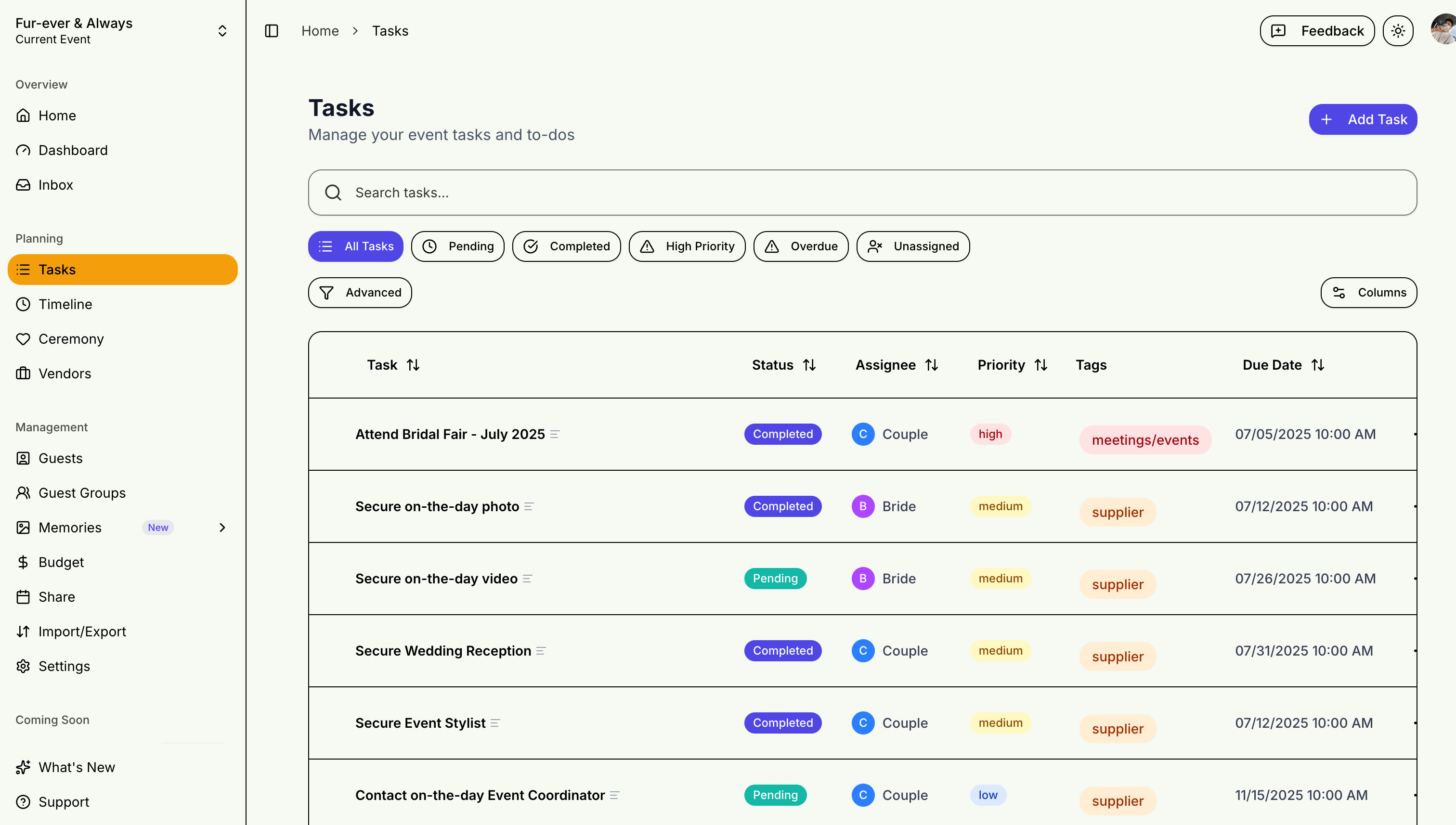
Never miss a deadline with STEVEN's task management features. Assign tasks to real people on your team, toggle between table and list views, and edit details inline.
Creating Tasks
Adding a Task
- Click "Add Task"
- Enter task title and description
- Set due date and priority
- Assign to a team member — pick from event collaborators, wedding party members, or enter a custom name
- Assign to category
Task Categories
- Venue & Catering
- Attire & Beauty
- Photography
- Music & Entertainment
- Decorations
- Invitations
- And more...
Managing Tasks
Task Status
- To Do: Not started
- In Progress: Currently working on
- Completed: Done!
Priority Levels
- High (red)
- Medium (yellow)
- Low (green)
Views
Table View
The default view with sortable columns, bulk actions, and advanced filtering by status, priority, assignee, and due date.
List View
A cleaner, focused view for quick scanning. Click any task to open the detail panel for inline editing.
Dashboard Integration
Tasks appear on your dashboard:
- Overdue tasks highlighted
- Upcoming deadlines shown
- Quick completion toggles
Check your tasks regularly to stay on track with your planning!